Product & Design Lead, WebPros, 2024
WP Squared
A WordPress panel, shipped against a fixed date.
An all-in-one managed WordPress hosting control panel for hosting providers, agencies and hyperscalers. The product decisions were made before I arrived. My role was to deliver it: I set up a product and design process that didn't exist yet, and made room for research that wasn't in the plan. Everything in the planned scope shipped on time.
- Client
- WebPros
- Role
- Product & Design Lead
- Team
- 1 product designer, early in her career
- Scope
- Product process, design system, research
- Timeline
- 5 months, 2024
- Live at
- wpsquared.com
- +30%Revenue increaseGO54, one of the first partners, reported a 30% increase in revenue within six months of launching on WP Squared.
- 5 monthsTo the deadlineFrom no process to the launch of a working MVP with the full planned scope. The deadline was fixed, and it was met.
- LiveUsed by hosting companies such as GO54 and GMO-Z.com NetDesignLive at wpsquared.com.
Overview
A project with a hard deadline and no process behind it.
WP Squared is an all-in-one managed WordPress hosting control panel, built on cPanel and powered by CloudLinux, Imunify360, AccelerateWP, Patchstack and Extendify. It targets hosting providers, agencies and hyperscalers who need to deliver a premium, modern WordPress experience.
WordPress powers over 40% of the web, yet the tooling available to hosting companies was still mostly legacy and hard to use for anyone who wasn't an expert. WP Squared set out to change that.
The product decisions had been made before I arrived. What went into the product was set in stone, so my question was a different one: how do we ship all of it on time? With the scope fixed, the only levers were the timeline and a process that didn't exist yet. That meant building the entire practice from the ground up while keeping pace.
The problem
What I walked into.
-
No time
The deadline was the launch of a working MVP, five months out. There was no time for a conventional process.
-
No process
The product was moving straight from brief to high fidelity, one screen at a time. Screens were being designed with no flows connecting them, so they didn't add up to a product, and the developers had no way to know how one screen led to the next.
-
No foundation
There was no design system, component library or documented patterns, so every screen was designed in isolation. That created inconsistency and slowed development.
Approach
Build the practice while the product is being built.
-
Introduced process and method
Structure came before screens and wireframes before polish, and annotations became the handoff standard. This stopped the same problems from recurring.
-
Built the design system in parallel
Getting the library adopted took more work than building it: components applied inconsistently, tokens bypassed, no shared language with engineering. So the full working structure followed: how flows are documented before screens are built, how annotations travel with specs, what “ready for development” actually means, and how the library maps to what gets coded. Weekly syncs with the engineering lead kept feasibility in the room, and decisions were made there rather than in ticket comments.
-
Designed for more than one user
Hosting providers configure server-level settings. Agency owners, freelancers and business owners manage their WordPress sites day to day. The hierarchy was built around both, respecting the technical depth each needed without exposing complexity to those who didn't.
-
Set a shipping cadence
Flows, wireframes, prototype, stakeholder review, iterate. A shared rhythm and a predictable path from idea to production. Nothing was polished until the structure was sound, and nothing went to development until it had been tested against real use cases and signed off by product.
Research
Research was not in the plan, so I secured a validation round.
Research wasn't in the timeline at all. I pushed to make space for it even in a compressed schedule. It worked mostly as validation: checking with users that what the team had already defined made sense to them, and whether anything was missing.
No flow went to handoff without being checked with real users.
Key decisions
A powerful, complex stack, shown at the right depth to the right person.
-
Making complexity invisible
The underlying stack is powerful and complex. The job was to surface the right level of information to the right user without oversimplifying or overwhelming them. Progressive disclosure throughout the dashboard kept the default view clean and action-oriented, with advanced settings one level down.
-
From warnings to confidence
Earlier iterations surfaced security and performance data like a warning system, with heavy use of red and amber and technical jargon. I reframed these as confidence signals. Users see at a glance that their sites are fast and safe, with drill-down for those who want the detail.
-
The design system as a shared language
The component library became the handoff language between design and engineering. Every component was specced with states, variants and responsive behaviour documented. This reduced back-and-forth and ambiguity for engineering.
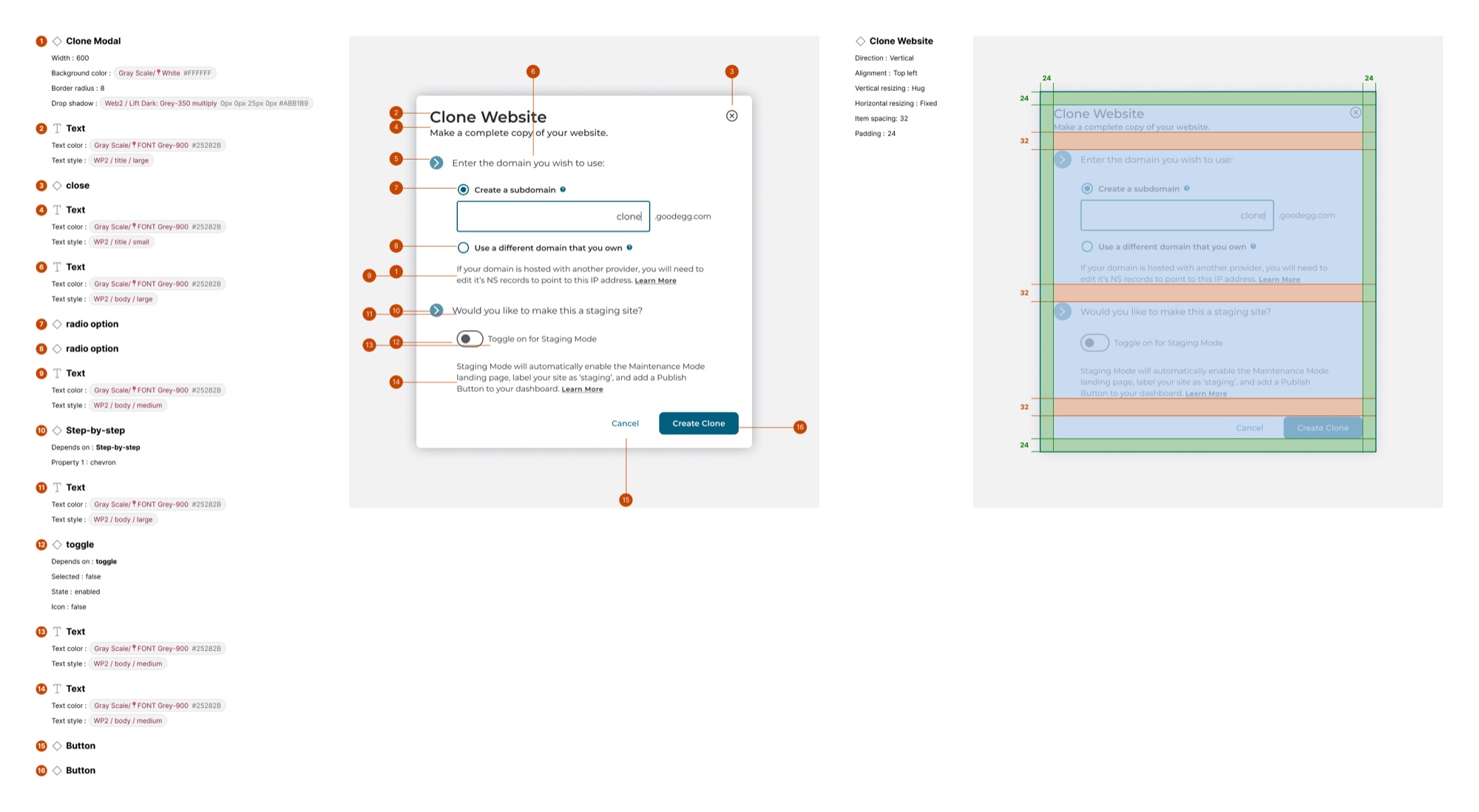
A handoff spec: the Clone Website modal, annotated with tokens, styles and spacing
The pushback
The main challenge was establishing a process at all.
Yes, we were under time pressure. But two things weren't negotiable. Every feature was designed as a complete flow, happy paths and unhappy paths included, so engineering had defined behaviour for every error state. And that flow went through a round of validation with real users before handoff. The pressure was to go straight to screens, and I pushed back on skipping that thinking.
Even if steps had to be compressed along the way, there were foundations that couldn't move.
Steps were compressed to fit the timeline; flows and validation were kept.
The product
Everything in the planned scope shipped.
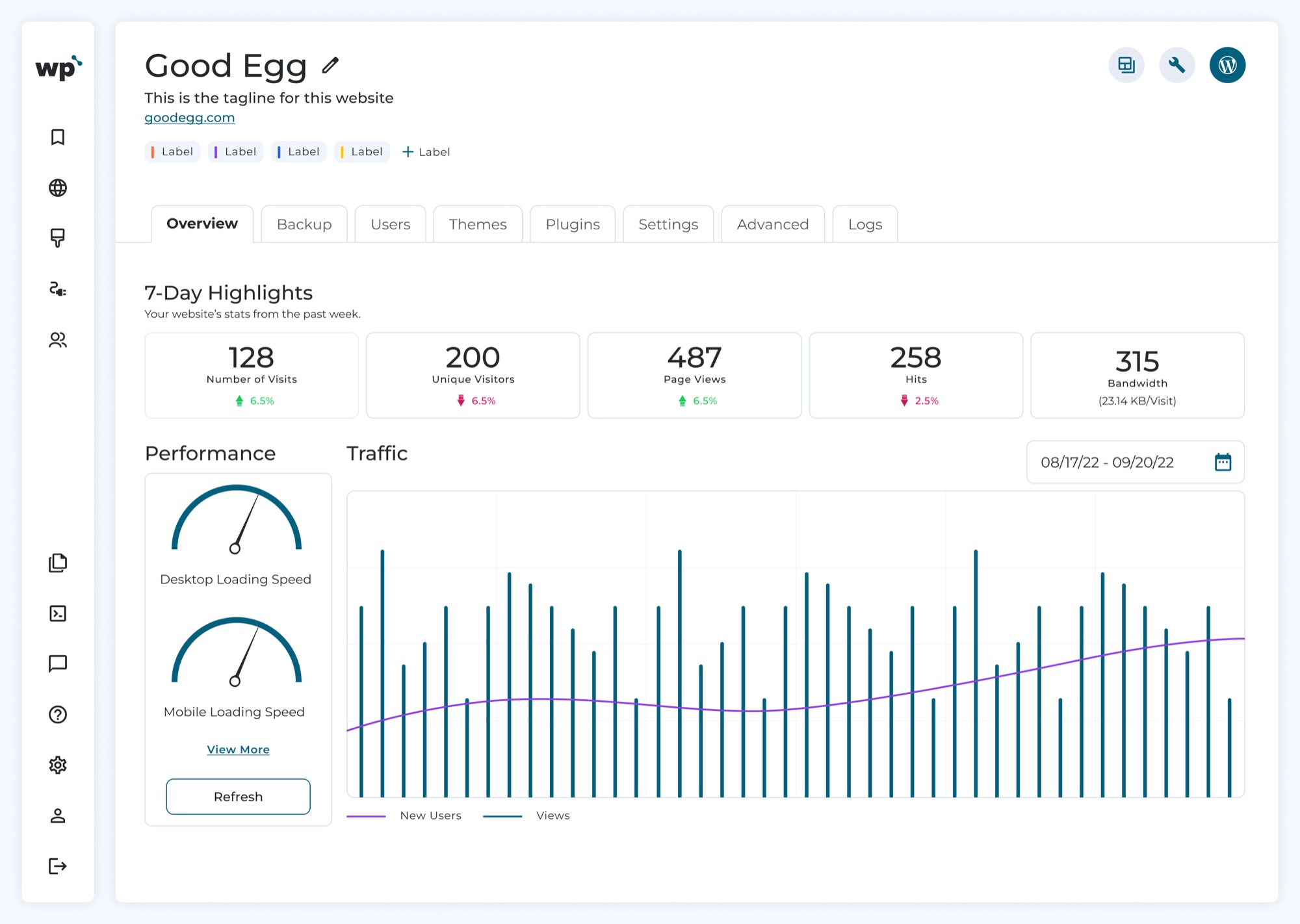
The whole product planned for launch went out on time: site overview, backup, users, themes, plugins, settings, advanced settings and logs, plus site cloning, maintenance mode and one-click access to WP Admin, with notifications and updates alongside. Two of those surfaces below.
-
Dashboard
Site health on the first screen
Performance, security and site health read at a glance, with the detail one level deeper for those who want it. Hosting providers and site owners get an immediate read of what's working.
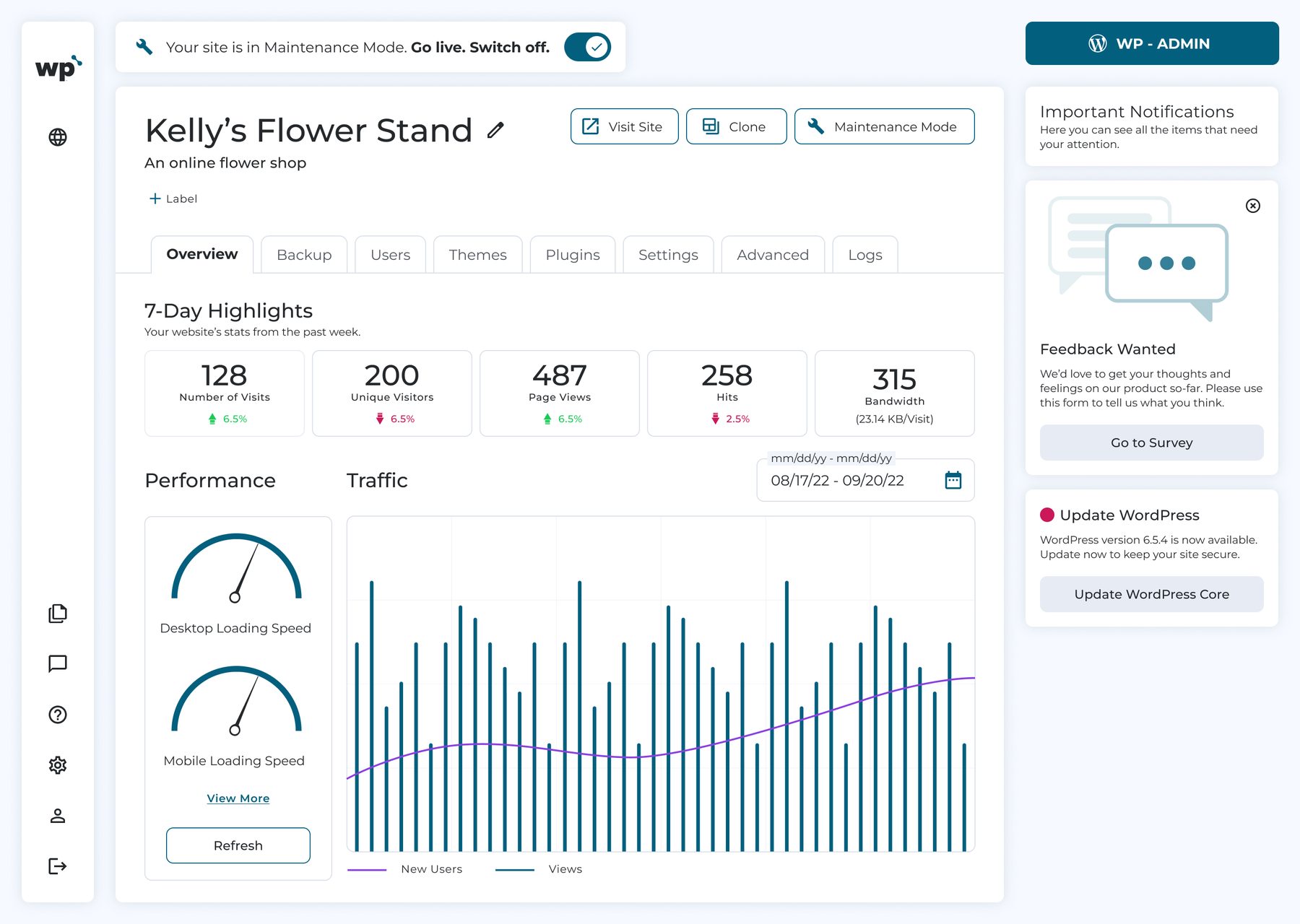
Dashboard, with notifications and updates alongside -
Plugins
A navigable plugin list
A complex plugin ecosystem made navigable through clear categorisation, consistent component patterns, and actions that live exactly where users expect them, without burying functionality behind layers of navigation.
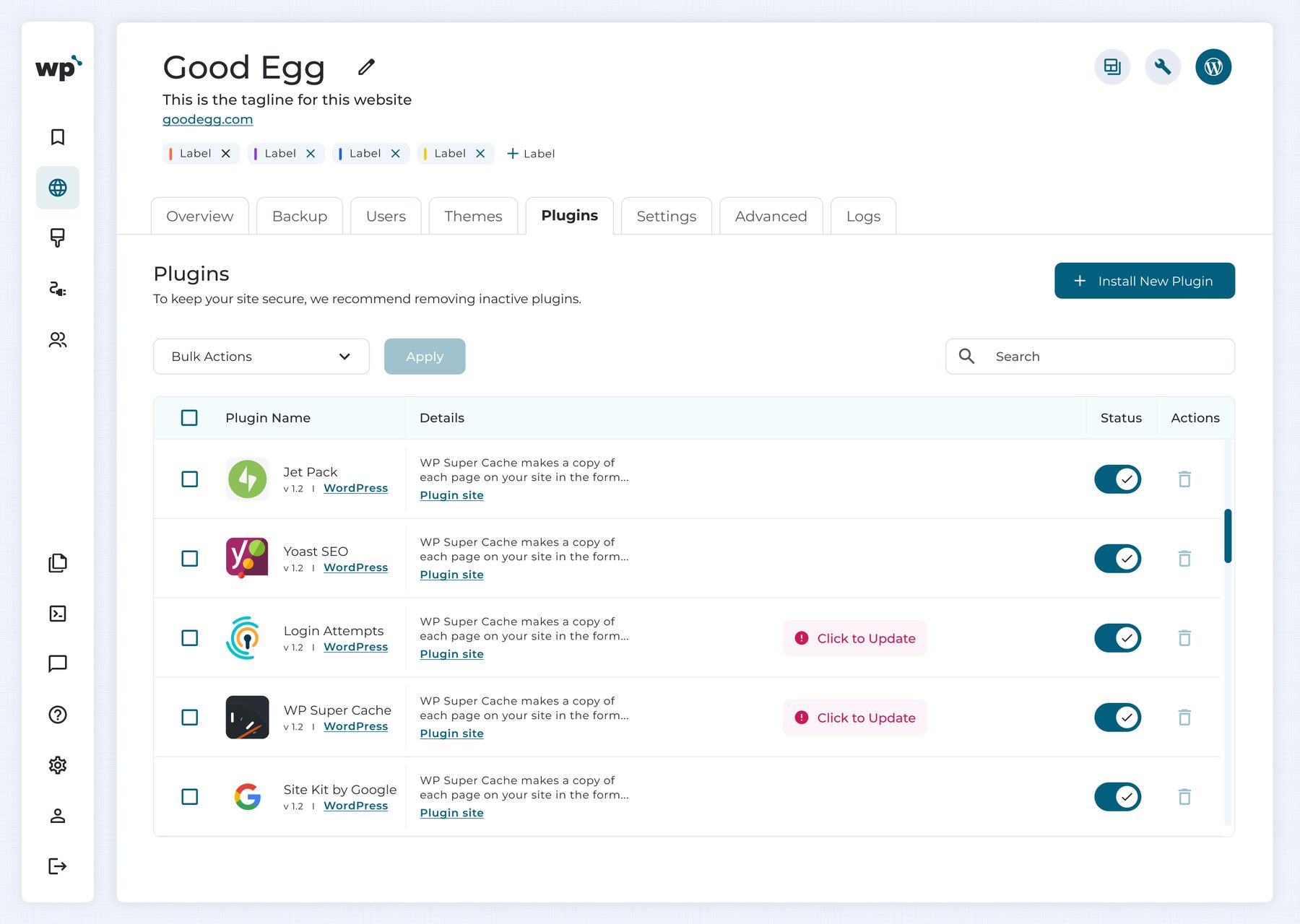
Plugins, status and updates in one table
Reflection
“The launch met its date, and the process stayed in place after I left.”
WP Squared was a demanding project. Designing under real time pressure while building a process and mentoring a teammate required rigorous prioritisation and clear communication with stakeholders.
It also shaped how I see leadership: making the team better at the work, and leaving behind a process they can run without me. I stayed until the process was in place and my part of the work was done; the designer I mentored finished the project, running the process without me.
What I would change: I would insist on hiring at least two more senior designers from the start. With one junior designer as the only resource, the timeline relied heavily on process to compensate for limited experience.